
Smart Displays vs Smart Speakers: Choosing the Right Hub for Your Kitchen

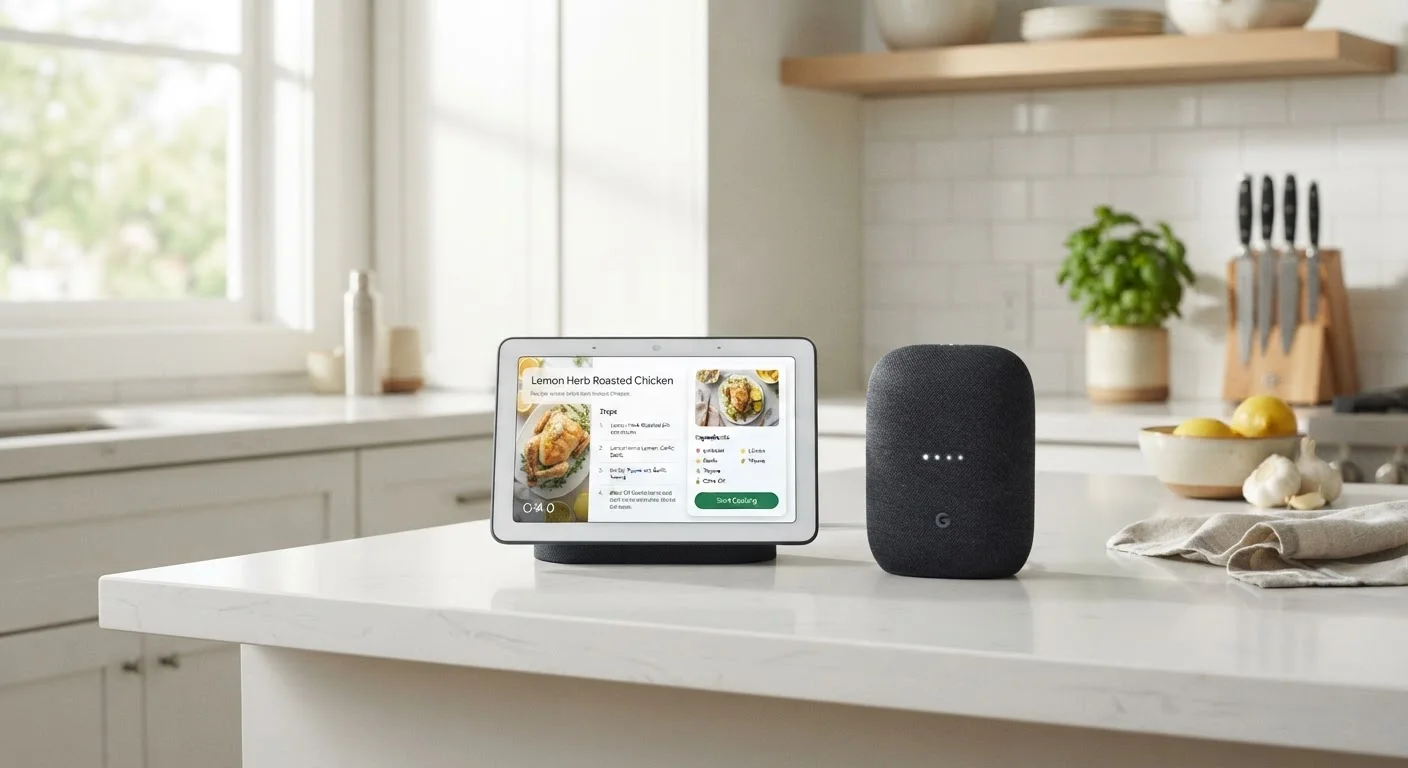
Both sit on your counter and answer questions — but they serve quite different purposes. Here's how to decide which fits your routine better.
Our Verdict
Smart displays and smart speakers both work well as kitchen hubs, but they serve different priorities. A smart display earns its place if you cook from recipes, make video calls, or want visual feedback on timers and weather. A smart speaker is the simpler, more affordable choice if you mainly want music, quick questions answered, and voice control of smart home devices.
| Best for | Recommended |
|---|---|
| Those who cook frequently and follow step-by-step recipes | Smart Display |
| Those who want a low-profile, budget-friendly kitchen assistant | Smart Speaker |
| Households that make frequent video calls from the kitchen | Smart Display |
| Those focused primarily on music and smart home control | Smart Speaker |
Key takeaways
- Smart displays add a screen, enabling recipes, video calls, and visual timers — smart speakers are audio-only.
- Smart speakers typically cost less and take up less counter space than smart displays.
- For hands-free cooking assistance, a screen is genuinely useful; for music and quick questions, audio is enough.
- Both types connect to smart home devices and can answer voice commands reliably.
- Your kitchen routine — not raw features — should drive the decision.
What Each Device Actually Does
At their core, both smart displays and smart speakers are voice-activated assistants. You speak a command or question, and the device responds — playing music, setting a timer, answering a trivia question, or adjusting a connected smart light. The difference is the screen.
A smart speaker is a compact, cylindrical or spherical device with no display. It listens, it speaks, it streams audio. Commands and responses happen entirely through sound.
A smart display adds a touchscreen — typically ranging from five to ten inches — to that same foundation. It can show you a recipe card, play a YouTube tutorial, display a video call, or put a visual countdown timer where you can see it across the kitchen.
Both types integrate with popular smart home ecosystems, so either can dim your lights, check your thermostat, or add items to a shared shopping list. That core functionality is roughly equivalent. The meaningful differences emerge when you look at how people actually use their kitchens day to day. For a broader look at building a setup around these devices, see The Complete Guide to Living with Everyday Smart Gadgets.
Where a Screen Genuinely Helps
The kitchen is one of the few rooms in a home where a screen on a voice assistant pays clear dividends — because your hands are often wet, floury, or holding a knife.
With a smart display, you can:
- Follow recipes step by step without touching your phone or flipping pages. The display advances when you ask it to, and you can glance at ingredient lists without reading them aloud.
- Watch cooking technique videos to check a technique — braising, folding egg whites, scoring bread — right where you're working.
- See timers clearly. When you have three pots going simultaneously, a visual countdown visible across the room is more practical than audio-only alerts.
- Make video calls while you cook — useful for cooking alongside family members in another location or just chatting hands-free.
- Check the weather or news at a glance without asking for a verbal summary.
If any of these scenarios describe your kitchen routine, the screen moves from a nice-to-have to a genuine convenience.
| Smart Display | Smart Speaker | |
|---|---|---|
| Screen | Yes — touchscreen (5"–10") | No |
| Recipe assistance | Step-by-step visual display | Audio read-aloud only |
| Video calls | Yes, with built-in camera | No |
| Visual timers | On-screen countdown | Audio alerts only |
| Audio quality | Good to very good | Often better at same price point |
| Counter footprint | Larger; needs screen-facing placement | Compact; flexible placement |
| Smart home control | Full voice and touch control | Full voice control |
| Privacy (camera) | Camera present; usually has cover | No camera |
| Typical price range | Higher | Lower |
Where a Smart Speaker Is Sufficient
For many households, a smart speaker does everything they actually need — and does it without occupying much counter real estate or budget.
A smart speaker handles music and podcasts with good audio quality, often better than a comparably priced display because the hardware prioritizes sound over visuals. It answers quick questions — unit conversions, substitution ideas, cooking temperatures — instantly and clearly. It controls smart home devices just as capably as a display. And it sets timers and reminders reliably.
If your kitchen use case is mostly "play something while I cook" and "hey, how many tablespoons in a quarter cup?" then spending more for a screen you rarely look at is hard to justify.
Smart speakers also blend into a kitchen more easily from a design standpoint — they're smaller and less visually prominent. If counter space is tight or you prefer a cleaner look, that matters. Speaking of kitchen design trade-offs, the same kind of thinking applies to storage choices — our article on open shelving vs. closed cabinetry walks through a similar weighing of practicality and aesthetics.
Start Simple, Upgrade Later
If you're unsure which device suits your routine, starting with a smart speaker is a lower-commitment way to learn how you actually use voice assistants in the kitchen. Many people find they rely on audio commands far more than expected — or discover a screen would genuinely change how they cook. Either way, you'll have real experience to guide your next decision rather than guessing upfront.
Practical Factors to Weigh Before Choosing
Beyond the features themselves, a few practical considerations often determine which device is the right fit:
- Counter space
- Smart displays require more room and a nearby outlet positioned where the screen faces you. A small kitchen may make the choice for you.
- Privacy comfort
- Smart displays include cameras for video calls — a feature some people find useful, others find uncomfortable. If you'd prefer no camera in the kitchen, a speaker removes that concern entirely.
- Household members
- Kids and older adults often find visual interfaces easier to interact with independently, which can tip the scales toward a display.
- Existing ecosystem
- Both types of devices work with major smart home platforms. If you already use a particular voice assistant on your phone, choosing a device in that same ecosystem tends to make setup and daily use smoother.
If this is your first smart home device, the setup process is simpler than most people expect. Getting your first smart home device up and running walks through exactly what to expect from unboxing to daily use. And if you're looking at other ways to make kitchen appliances smarter without replacing them, smart plugs are worth understanding as a complementary option.
All published content on this website is for informational and educational purposes only and should not be taken as professional advice. We recommend that readers seek expert opinion before making any decisions. The website is not responsible for any actions taken based on the information provided on this website. We are not liable for any inaccuracies, modifications, or omissions in information. Moreover, external links or third-party content are provided for convenience; we are not liable for their correctness. Users are advised to verify every piece of information before they use it for any purpose.