
Browser Extensions vs. Standalone Apps: Which Tool Fits the Job?

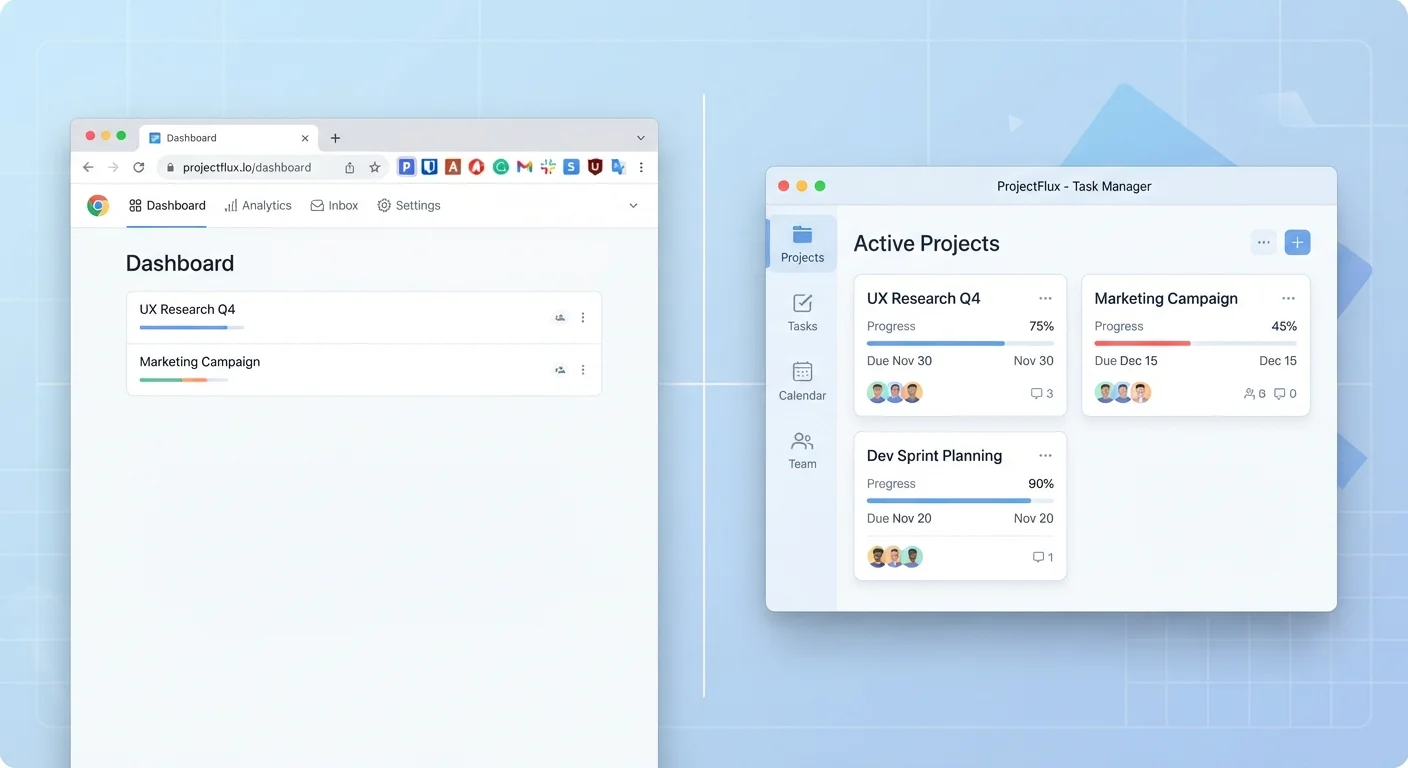
Not everything needs a full download. Compare browser extensions and dedicated apps to understand when each format genuinely serves you better.
Option A
Browser Extensions
The lightweight, in-browser helper that works where you already are.
Best for: Tasks that happen inside or alongside web browsing, such as saving articles, checking grammar, or managing passwords.
Option B
Standalone Apps
The full-featured, independent tool built for focused, sustained work.
Best for: Complex workflows, offline access, and tasks that demand deep functionality beyond what a browser can support.
Key takeaways
- Browser extensions live inside your browser and work best for tasks that are tightly tied to web activity.
- Standalone apps run independently, making them suitable for offline use and resource-intensive work.
- Extensions are quick to install but limited by browser architecture and permissions settings.
- Standalone apps typically offer broader features but consume more storage and system resources.
- Many services now offer both formats — choosing the right one depends on your workflow, not brand loyalty.
- Both formats carry privacy considerations: always review what access each tool requests before installing.
What Each Format Actually Is
A browser extension is a small software add-on that plugs directly into a web browser — Chrome, Firefox, Safari, Edge, and others all support them. Extensions run within the browser's environment, meaning they can read and interact with web pages, add buttons to your toolbar, and respond to what you're doing online. They install from the browser's own extension store and activate almost immediately.
A standalone app — sometimes called a desktop app or native app — is a full program installed directly on your operating system. It runs independently of any browser, manages its own processes, and has direct access to your device's hardware, file system, and system settings. Examples range from word processors and photo editors to project management tools and music software.
Both formats solve real problems. The question is whether the problem you're facing fits the tool's actual architecture — not just the tool's marketing.
Where Browser Extensions Excel
Extensions earn their place when your task is fundamentally tied to what's happening in a browser tab. Grammar checkers that highlight errors as you type into a web form, password managers that autofill login fields, ad blockers that filter page content, and read-later tools that clip articles — all of these make sense as extensions because they work on web content, not alongside it.
Speed and frictionless access are real advantages here. An extension icon sits a single click away in your toolbar. There's no separate window to open, no separate login in most cases, and no background process eating up memory when you're not actively using it.
Extensions also tend to be easier to remove cleanly. If a tool isn't working for you, uninstalling it takes seconds and leaves little trace. That makes them a sensible way to experiment before committing to a more involved piece of software. For more on how that experimentation habit can go sideways, see why downloaded apps often go unused.
Cross-Platform Consistency Worth Noting
Extensions are also worth considering for users who work across multiple operating systems. Because they live inside the browser, the experience tends to be more consistent across Windows, macOS, and Linux than a native app counterpart would be. This is especially useful for shared or work-issued devices where installing full applications may be restricted by IT policy.
Extensions are also worth considering for users who work across multiple operating systems — because they live in the browser, the experience is often more consistent across Windows, macOS, and Linux than a native app would be.
Where Standalone Apps Have the Edge
The moment a task moves beyond web content — or demands performance, privacy, or precision — standalone apps typically deliver more. A video editing suite, an accounting package, a music production tool, or a professional design program cannot realistically live inside a browser tab without significant trade-offs in speed and capability.
Standalone apps also handle offline work better. Because they store data locally and run independently of a network connection, they remain functional even when your internet drops. This is a meaningful difference for anyone who travels, works in areas with inconsistent connectivity, or simply doesn't want a cloud outage to interrupt their day. Understanding how offline and online apps differ can help you make that call more confidently.
Standalone apps also integrate more naturally with your file system. Opening, saving, and organizing files is seamless because the app communicates directly with your operating system. Extensions, by contrast, are constrained by browser sandboxing — a security feature that limits what they can access, which is protective but also limiting.
| Criterion | Browser Extensions | Standalone Apps |
|---|---|---|
| Installation speed | Seconds, no system restart needed | Minutes; may require restart |
| Offline functionality | Generally requires internet | Often works fully offline |
| System resource use | Minimal; runs inside browser | Higher; runs its own process |
| Feature depth | Limited by browser architecture | Full-featured, purpose-built |
| File system access | Restricted by browser sandboxing | Direct, unrestricted access |
| Cross-platform consistency | High, if browser is consistent | Varies by OS version |
| Ease of removal | One click, minimal trace | Uninstaller required; may leave files |
| Privacy risk surface | Can read browser data if permitted | Can access device hardware if permitted |
Privacy, Permissions, and the Hidden Costs of Convenience
Neither format is inherently safer than the other, but both deserve scrutiny before installation. Browser extensions can request surprisingly broad permissions — access to all data on all websites, for example — which can be a significant privacy risk if the extension is poorly maintained or changes ownership. Reviewing what an extension can access before adding it is a basic but often skipped step.
Standalone apps have their own permission requests: camera, microphone, location, contacts, and more. Understanding what each permission actually enables — and whether a given tool genuinely needs it — is worth the minute it takes. What app permissions really mean breaks this down clearly.
There's also a software clutter angle. Installing either format impulsively — because a website recommended it, or because it seemed useful in the moment — contributes to digital bloat that can slow devices and create security gaps. Signs of software bloat on your devices is worth a read if your extensions bar is crowded and your app drawer has tools you haven't opened in months.
Making the Call: A Practical Framework
When you're deciding which format to reach for, a few questions cut through the noise:
- Is the task web-based? If you're acting on something inside a browser tab, an extension often fits naturally.
- Do you need it offline? If connectivity isn't guaranteed, a standalone app is more reliable.
- How complex is the workflow? Light, occasional use suits extensions; deep, recurring work typically benefits from a dedicated app.
- How much storage and system performance can you spare? Extensions are lighter; apps consume more but usually deliver more.
- How long will you use it? For short-term needs, an extension's low commitment is a plus. For daily-driver tools, a well-designed standalone app may be worth the install.
It's also worth noting that the distinction is blurring. Many services now offer a browser extension and a standalone app — often with different feature sets at each tier. In those cases, consider starting with the extension to test whether the tool fits your actual habits before downloading the full version. The same logic applies when evaluating free versus paid app tiers — use what you genuinely need, not what a pricing page suggests you should want.
All published content on this website is for informational and educational purposes only and should not be taken as professional advice. We recommend that readers seek expert opinion before making any decisions. The website is not responsible for any actions taken based on the information provided on this website. We are not liable for any inaccuracies, modifications, or omissions in information. Moreover, external links or third-party content are provided for convenience; we are not liable for their correctness. Users are advised to verify every piece of information before they use it for any purpose.